What size power supply does your LED strip need?
Two numbers decide it: the strip’s voltage and how much current it can pull at full white. Here’s how to get both, with a chart and a calculator that use the same numbers as the Watt’s The Connection planner.
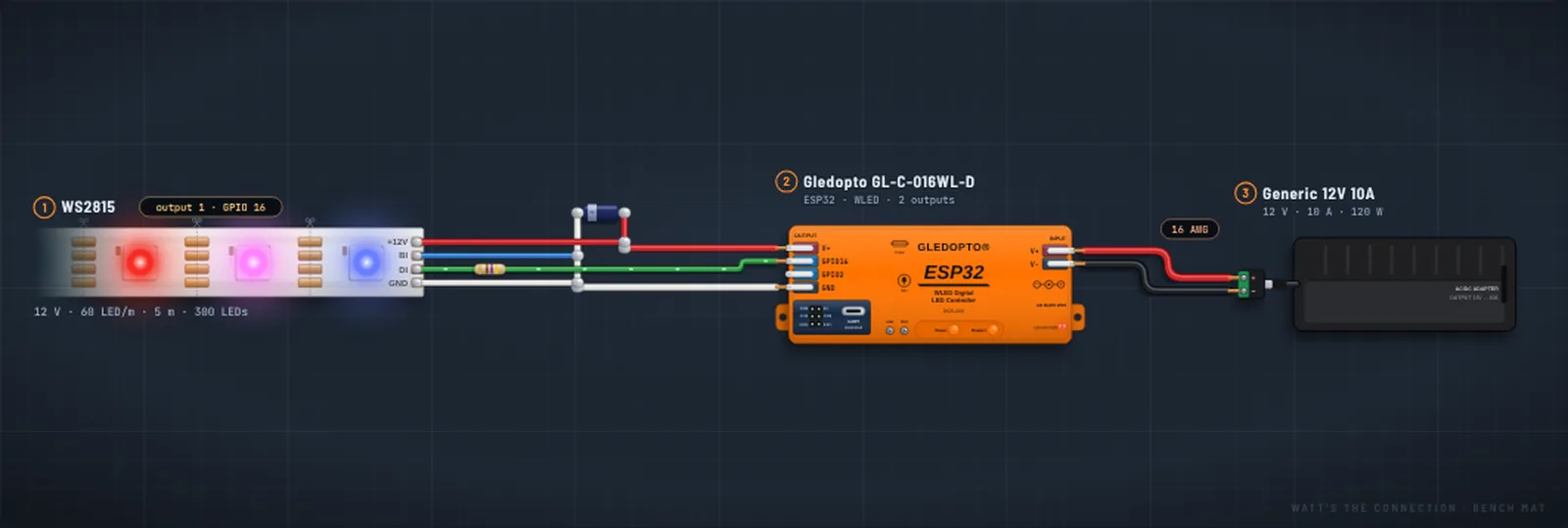
Use a supply with the same voltage as the strip, then multiply the strip’s amps per meter by its length and add 25%. For example, 5 m (16.4 ft) of 12 V WS2815 at 60 LEDs/m can draw 7.5 A at full white, so it needs a 12 V supply rated at least 9.4 A: a 10 A supply is the usual pick. The same length of 5 V WS2812B can draw 18 A and needs at least 22.5 A.
Power supply calculator
Pick your strip and length. It uses the same numbers as the planner.
- Full-white draw
- –
- Supply, at least
- –
- Power wire
- –
- Power injection
- –
A brightness cap only works with WLED or FastLED, which hold the current under a limit. App controllers (SP-series and similar) can’t, so leave it at None for them.
Step 1: match the voltage
The voltage is printed on the strip and its reel: 5 V, 12 V or 24 V for most addressable LEDs. The power supply has to match it. A supply slightly under is safe and just runs a little dim; never go over.
Never feed LEDs a higher voltage than printed on them. 12 V into a 5 V strip burns out the LEDs within seconds and can start a fire. Many enclosed supplies have a small voltage-adjust screw: leave a 5 V supply at 5 V, because turned up it can go past what 5 V LEDs take.
Step 2: work out the current
Multiply the strip’s amps per meter by the length you’re lighting. If the label gives watts per meter instead, divide by the voltage: 18 W/m on a 12 V strip is 1.5 A per meter.
Every LED adds to the total, so density matters a lot: a 144-per-meter WS2812B strip draws more than twice what the 60-per-meter version does for the same length. RGBW strips draw more per LED than RGB ones, because each pixel adds a white LED.
| Strip | Volts | Amps per m | Watts per m | Amps per ft |
|---|---|---|---|---|
| WS2812B60 LEDs/m | 5 V | 3.6 A | 18 W | 1.1 A |
| WS2812B144 LEDs/m | 5 V | 8.6 A | 43 W | 2.6 A |
| WS2812B ECO30 LEDs/m | 5 V | 1.8 A | 9 W | 0.55 A |
| SK6812 RGBW60 LEDs/m | 5 V | 4.8 A | 24 W | 1.5 A |
| APA10260 LEDs/m | 5 V | 3.6 A | 18 W | 1.1 A |
| WS281560 LEDs/m | 12 V | 1.5 A | 18 W | 0.46 A |
| WS2815144 LEDs/m | 12 V | 3.6 A | 43.2 W | 1.1 A |
| WS281160 LEDs/m | 12 V | 1.5 A | 18 W | 0.46 A |
| TM1814 RGBW60 LEDs/m | 12 V | 2 A | 24 W | 0.61 A |
| WS281160 LEDs/m | 24 V | 0.75 A | 18 W | 0.23 A |
| WS281560 LEDs/m | 24 V | 0.75 A | 18 W | 0.23 A |
| WS2814 RGBW60 LEDs/m | 24 V | 1.2 A | 28.8 W | 0.37 A |
Full white at 100% brightness, the worst case. Real strips often draw a little less, but sizing to this means the supply is never pushed past its rating. Most WS2815 strips are 12 V; the 24 V version is less common, so check your reel’s label.
Step 3: add 25% headroom
Power supplies run cooler and last longer below about 80% of their rating, so divide the full-white draw by 0.8 (the same as adding 25%). That’s the smallest rating to look for. Going bigger is fine: the LEDs only draw what they need, as long as the voltage matches.
Power supply chart by strip and length
| Strip | 1 m3.3 ft | 2 m6.6 ft | 3 m9.8 ft | 5 m16.4 ft | 10 m32.8 ft |
|---|---|---|---|---|---|
| WS2812B5 V · 60/m | 4.5 Adraws 3.6 A | 9 Adraws 7.2 A | 13.5 Adraws 10.8 A | 22.5 Adraws 18 A | 45 A*draws 36 A |
| WS2812B5 V · 144/m | 10.8 Adraws 8.6 A | 21.5 Adraws 17.2 A | 32.3 Adraws 25.8 A | 53.8 A*draws 43 A | 108 A*draws 86 A |
| SK6812 RGBW5 V · 60/m | 6 Adraws 4.8 A | 12 Adraws 9.6 A | 18 Adraws 14.4 A | 30 Adraws 24 A | 60 A*draws 48 A |
| WS281512 V · 60/m | 1.9 Adraws 1.5 A | 3.8 Adraws 3 A | 5.7 Adraws 4.5 A | 9.4 Adraws 7.5 A | 18.8 Adraws 15 A |
| WS281112 V · 60/m | 1.9 Adraws 1.5 A | 3.8 Adraws 3 A | 5.7 Adraws 4.5 A | 9.4 Adraws 7.5 A | 18.8 Adraws 15 A |
| WS281124 V · 60/m | 1 Adraws 0.75 A | 1.9 Adraws 1.5 A | 2.9 Adraws 2.3 A | 4.7 Adraws 3.8 A | 9.4 Adraws 7.5 A |
The top number is the smallest supply rating to look for (the full-white draw plus 25%). Pick the next common size up, at the strip’s voltage. * Above about 30 A, don’t run it as one feed: split the strip into sections, each with its own fused feed, and often its own supply.
Use a smaller supply with a brightness limit
Full white at 100% is rare in real use: most effects and colors draw a fraction of it. WLED and FastLED can hold the current under a limit you set, so a smaller supply can work:
- WLED: Config → LED Preferences → enable the automatic brightness limiter and set Maximum current. Its default is 850 mA, which is why a fresh WLED install can look dim on a big strip.
- FastLED: call
FastLED.setMaxPowerInVoltsAndMilliamps(volts, milliamps)in your sketch.
Both work from an estimate of the current, not a measurement, and their estimate per LED can be lower than the worst case in the table above. So set the limit below your supply’s rating, keep some margin, and pick a supply with overload protection (most branded ones have it). Simple app-controlled controllers (the SP-series, for example) have no limit at all, so size their supply for full white.
Check the controller’s current rating too
Controllers are rated for the current through each output and in total. A 5 m run of 5 V WS2812B (18 A) is more than many single outputs are rated for. Spread long runs across outputs, cap the brightness, or feed power straight from the supply into the strip (see power injection). The planner checks the common controllers’ ratings for you.
Wall-powered supplies: wire them safely
Plug-in power bricks are the simplest choice. Enclosed supplies (like the Mean Well LRS series) have screw terminals for mains power, which needs care:
- Use a 3-wire cord: live to L, neutral to N, earth to the earth or FG terminal. Keep the terminal cover on and clamp the cord so it can’t pull out.
- Some models have a 115 V / 230 V input switch. Set it for your country before plugging in.
- Never touch the terminals while it’s plugged in, and unplug it before changing any wiring.
- Outdoors, use a weatherproof (IP65 or IP67) supply on a GFCI outlet, with waterproof strip and sealed joints.
Not confident with mains wiring? Use a plug-in power brick, or have an electrician wire the supply.
Wire, connectors and fuses
The wire from the supply to the strip has to carry the strip’s full current without getting warm:
| Full-white current in the wire | Copper wire | Metric |
|---|---|---|
| up to 2.5 A | 20–22 AWG | 0.5 mm² |
| 2.5–6 A | 18 AWG | 1 mm² |
| 6–10 A | 16 AWG | 1.5 mm² |
| 10–18 A | 14 AWG | 2.5 mm² |
| 18–30 A | 12 AWG | 4 mm² |
Sized for the strip’s full-white current, even when you cap the brightness, so the wire is safe if the cap is ever lost. For runs of a few meters between the supply and the strip. Above 30 A, split the build into several fused feeds.
- At 5 V, keep feeds short. At the top of these ranges, a few meters of wire can lose half a volt, which is a lot out of 5 V. Go a size thicker for longer 5 V feeds.
- Use copper wire. Avoid “CCA” (copper-clad aluminum), which carries less and heats up.
- Check every connector’s rating. Small barrel plugs and the strip’s 3-pin plugs are often rated for only a few amps. Above that, use screw terminals or connectors rated for the current.
A large supply can push far more current into a short circuit than a strip’s thin copper can take. Put an inline blade fuse on each strip’s red (+) wire, close to the supply, rated about 1.25× what that strip can draw at full white (5 m of 12 V WS2815 at 7.5 A gets a 10 A fuse), in a holder rated for that fuse. The planner adds one whenever the supply can deliver at least 1.5× the fuse rating; below that, the supply’s own overload protection limits a short. Adding a fuse anyway is cheap insurance.
Worked examples
Each of these is a complete build in the planner with no problems found. Open one to see the wiring diagram, parts list and steps.
TV backlight: 3 m of 12 V WS2815
4.5 A at full white needs at least 5.7 A. The SP501E app controller can’t cap the current, so the supply is sized for full white: a 12 V 10 A brick, even though a backlight usually runs far dimmer.
Desk or shelf: 5 m of 12 V WS2815
7.5 A at full white needs at least 9.4 A, so a 12 V 10 A supply runs at 75% with full white on.
Short 5 V run: 2 m of WS2812B
7.2 A at full white needs at least 9 A. A 5 V 10 A supply covers it; connect it with screw terminals, since small barrel plugs are often rated for less.
Art car: two 5 m runs of 12 V WS2815
15 A for both runs at full white needs at least 18.8 A, so a 12 V supply of about 20 A or more. This one uses a Mean Well LRS-350-12 (29 A), one run on each controller output. The controller is rated for 15 A in total, so WLED’s limiter holds it at 75% brightness.
Outdoor eaves: 6 m of 24 V WS2811
At 24 V the same light takes half the current of 12 V: 4.5 A at full white, so at least 5.7 A. Outdoors it uses a weatherproof (IP67) supply, the Mean Well HLG-150H-24 (6.3 A), on a GFCI outlet, with the controller in a weatherproof box.
Common questions
Can a power supply be too big?
Not if the voltage matches. LEDs pull only the current they need, so a 12 V 30 A supply on a 5 A strip is fine. The one thing a big supply changes is how much current a fault can draw, which is why each strip gets its own fuse.
Watts or amps: which matters?
Both describe the same thing: watts = volts × amps. A 12 V 10 A supply is a 120 W supply. Match the voltage first, then make sure the amps (or watts) cover the strip with headroom.
Why does the end of my strip look dim or orange?
Usually that’s voltage drop along the strip, and the fix is feeding power in at more than one point: see LED strip power injection. If the whole strip dims, shifts color or flickers on bright scenes, the supply may be overloaded instead.
Should I pick 5 V, 12 V or 24 V?
For the same light, a 12 V strip draws less than half the current of a 5 V strip, and 24 V half again. The watts stay about the same, but lower current means thinner wire and longer runs before the far end dims. 5 V strips like WS2812B control every single LED and are the most common for small builds; 12 V and 24 V strips often light LEDs in groups.